
Our Short List of 3
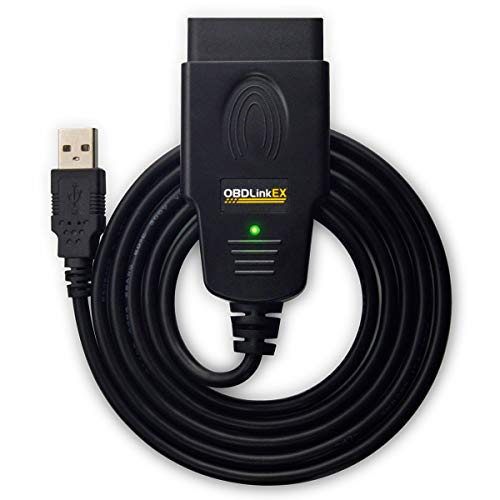
- Connection: USB, wired
- Host software: FORScan for Windows
- Protocols: OBD-II, Ford MS-CAN, Ford J1850 PWM
- Network switching: electronic switch across HS-CAN, MS-CAN and J1850, no manual toggle

- Type: standalone handheld scanner with built-in display
- Display: 2.8-inch color LCD, 320 x 240
- Vehicle coverage: Ford, Lincoln and Mercury full-system diagnostics (maker lists 1996-2019); generic OBD2 modes for other brands from 1996
- Systems covered: engine, ABS, SRS, TPMS, SAS, BMS, EPB, EPS, TCM and others

- Connection: USB, wired
- Host software: FORScan for Windows (recommended by the FORScan team, per the maker)
- Networks: HS-CAN and MS-CAN with automatic switching
- Protocols: standard OBD-II protocols plus Ford MS-CAN
All 4 Picks at a Glance
| Product | Specs | Action |
|---|---|---|
| 1. OBDLink EX FORScan OBD Adapter |
| Check price on Amazon |
| 2. ANCEL FD700 Ford Lincoln Mercury OBD2 Scanner |
| Check price on Amazon |
| 3. Vgate vLinker FS OBD2 USB Adapter |
| Check price on Amazon |
 5. BlueDriver Bluetooth Pro OBDII Scan Tool |
| Check price on Amazon |
Key takeaways
- Compare the best scan tool for Ford cars and trucks, from FORScan USB adapters with MS-CAN access to a Ford-only handheld and a phone-based scanner.
What's inside
As an Amazon Associate I earn from qualifying purchases. This post may contain affiliate links at no extra cost to you.
Ford vehicles reward owners who bring the right diagnostic gear. Alongside the standard OBD2 language that every modern vehicle speaks, Ford runs a second, medium-speed CAN network called MS-CAN, and that network carries body, convenience and infotainment modules that a generic reader never sees. Many service functions on a Ford also live inside Ford-specific modules, so a tool that only reads engine codes leaves much of the vehicle unexamined.
Every pick in this guide earned its place because its maker publishes Ford-specific capability. Three are adapters built for FORScan, the software Ford owners rely on for module-level access. One is a handheld scanner programmed exclusively for Ford, Lincoln and Mercury. The last is a phone-based sensor with published enhanced coverage for Ford and Lincoln, including ABS, airbag, transmission and TPMS codes. Between them, they cover fault codes across the vehicle, live data, service resets and, through FORScan, module configuration on supported models.
Disclosure: As an Amazon Associate, we earn from qualifying purchases made through links on this page, at no extra cost to you.
Sections
The Five Picks at a Glance
| Product | Connection | Ford access | Needs a computer |
|---|---|---|---|
| OBDLink EX | USB | FORScan, MS-CAN and J1850 | Yes, Windows |
| ANCEL FD700 | Handheld, built-in screen | Ford-only full-system diagnostics | Only for updates |
| Vgate vLinker FS | USB | FORScan, HS-CAN and MS-CAN | Yes, Windows |
| Vgate vLinker FD+ | Bluetooth 4.0 BLE | FORScan and FORScan Lite, MS-CAN | No, phone works |
| BlueDriver Bluetooth Pro | Bluetooth | Enhanced Ford and Lincoln codes | No, phone works |
1. OBDLink EX FORScan OBD Adapter
- Connection: USB, wired
- Host software: FORScan for Windows
- Protocols: OBD-II, Ford MS-CAN, Ford J1850 PWM
- Network switching: electronic switch across HS-CAN, MS-CAN and J1850, no manual toggle
The OBDLink EX is the adapter the FORScan team itself recommends, and OBD Solutions built it with that team’s input. Its defining feature is an electronic switch that moves between the high-speed CAN bus, the Ford MS-CAN bus and the older Ford J1850 network on its own. Older adapters use a manual toggle that the driver has to flip when FORScan asks for the other network, and choosing the wrong position at the wrong moment can interrupt a session. The EX removes that failure point entirely, which matters most during configuration and programming work, where a dropped connection is more than an inconvenience.
Because it is a wired USB adapter, the connection stays stable for long sessions, and OBDLink rates its throughput at up to twenty times that of toggle-switch adapters, which speeds up module scans across a whole vehicle. Through FORScan on a Windows laptop, the EX reaches the Ford modules that generic tools skip, and FORScan’s extended license unlocks configuration functions on supported models, such as changing factory settings stored in the body control module. The trade-offs are clear ones: it needs a Windows computer, and its talents are aimed squarely at Ford, Lincoln, Mazda and Mercury vehicles rather than every brand in the driveway.
2. ANCEL FD700 Ford Lincoln Mercury OBD2 Scanner
- Type: standalone handheld scanner with built-in display
- Display: 2.8-inch color LCD, 320 x 240
- Vehicle coverage: Ford, Lincoln and Mercury full-system diagnostics (maker lists 1996-2019); generic OBD2 modes for other brands from 1996
- Systems covered: engine, ABS, SRS, TPMS, SAS, BMS, EPB, EPS, TCM and others
The FD700 takes the opposite approach to the adapters above: it is a self-contained handheld that ANCEL programmed for Ford, Lincoln and Mercury vehicles only, so no phone, laptop or separate software is involved in a scan. Plug it into the OBD2 port and it works through the vehicle’s systems, covering engine, ABS, SRS, TPMS, steering angle, battery management, electronic parking brake, transmission and more, on its own 2.8-inch color screen.
What separates it from ordinary handheld readers is the service menu. ANCEL publishes 33 advanced functions for the Ford family, including battery registration after a battery swap, ABS service bleed, electronic parking brake maintenance mode, DPF regeneration for diesel models, injector quantity adjustment (IQA), steering angle calibration, oil and TPMS resets, and transmission learning with adaptation table clearing. Those are the jobs that otherwise send owners to a dealer service lane. ANCEL’s own materials list full-system Ford coverage for model years 1996 through 2019, with standard OBD2 functions for other brands from 1996 onward, so owners of newer trucks should confirm their exact model year against ANCEL’s coverage information. Updates are free for the life of the tool and install over USB from a Windows computer.
3. Vgate vLinker FS OBD2 USB Adapter
- Connection: USB, wired
- Host software: FORScan for Windows (recommended by the FORScan team, per the maker)
- Networks: HS-CAN and MS-CAN with automatic switching
- Protocols: standard OBD-II protocols plus Ford MS-CAN
The vLinker FS is the other wired adapter that the FORScan team recommends, according to Vgate’s listing, and it covers the same Ford ground as the OBDLink EX: automatic switching between HS-CAN and MS-CAN, with no manual toggle for the driver to manage. FORScan identifies the adapter and moves between networks as a full-vehicle scan requires, reaching modules on both buses in one session.
Vgate publishes full support for FORScan’s function set, which includes the configuration and programming functions that the extended license enables on supported Ford models. The adapter’s firmware can itself be updated, which helps it stay current as FORScan and Ford platforms evolve. Like the EX, it is a Windows tool: the software is supplied by FORScan rather than by Vgate, and the listing notes that the diagnostic application is obtained separately. For owners who want the wired FORScan route and are comfortable setting up the software themselves, the FS covers the essential Ford-specific bases, MS-CAN access chief among them.
4. Vgate vLinker FD+ OBD2 Bluetooth Adapter
The FD+ brings FORScan access to a phone. It is a Bluetooth 4.0 BLE adapter that pairs with iPhone, Android and Windows devices, and it speaks to Ford’s MS-CAN network in addition to the five standard OBD-II protocols, which is the capability that separates Ford-ready adapters from generic wireless dongles. With FORScan Lite on a phone, it reads and clears fault codes across Ford modules and handles everyday checks without opening a laptop bag, and it can also pair with a Windows computer running the full FORScan program.
This is the pick for quick driveway diagnosis: identifying why a warning light is on, confirming a repair cleared a code, or checking live data on a trip. The honest boundary is software, not hardware. FORScan’s own documentation reserves the complete function set, including configuration and programming, for the Windows build, so owners planning module coding should treat the FD+ as a reading and service tool and keep a wired adapter in mind for deeper work. For everyone else, it delivers genuine Ford network access in the most convenient form factor here.
Specs
- Connection: Bluetooth 4.0 BLE, dual mode
- Platforms: iOS, Android and Windows
- Software: FORScan and FORScan Lite, plus compatible OBD apps (app obtained separately)
- Protocols: five standard OBD-II protocols plus Ford MS-CAN
- Vehicle coverage: Ford and Lincoln via MS-CAN; generic OBD-II vehicles
- Manufacturer part number: vLinker FD+ BLE4.0
- Maker: Vgate
5. BlueDriver Bluetooth Pro OBDII Scan Tool
- Connection: Bluetooth to a phone or tablet
- App: BlueDriver app for iOS and Android, free, with no subscription or in-app purchases (per the maker)
- Model: LSB2
- Manufacturer: Lemur Vehicle Monitors
BlueDriver takes yet another route: a small Bluetooth sensor paired with the maker’s own free app for iPhone and Android, with no subscription and no in-app purchases, according to Lemur Vehicle Monitors. Its Ford relevance is published and specific. BlueDriver lists Ford and Lincoln among the brands with full enhanced support, which means it reads and clears not just engine codes but ABS, airbag, transmission and TPMS codes on supported Ford models, the systems that generic adapters most often miss.
The app then explains what it found. Each code comes with a definition, likely causes and a repair report drawn from a database of verified fixes, which makes the BlueDriver the most approachable pick here for owners who are new to diagnostics. It also shows live data, freeze frame information and emissions readiness status for inspection preparation. Its limits are equally clear: it works only with the BlueDriver app, it cannot perform module configuration, and it does not carry out service procedures such as battery registration. As a first Ford diagnostic tool that lives in a glovebox and works with the phone already in your pocket, it is a strong fit.
How to Choose a Scan Tool for a Ford
Start with the network. MS-CAN access is the dividing line between Ford tools and generic ones. Modules for seats, lighting, climate, door locks and infotainment sit on that medium-speed bus, and any tool that cannot reach it will report a clean scan on a vehicle that still has stored faults. Every adapter above reaches MS-CAN; the FD700 was programmed around Ford’s module layout instead.
Decide how you want to work. The FORScan route offers the deepest access, including configuration changes on supported models, but it needs a Windows laptop for the full program and a little setup patience. A standalone handheld like the FD700 asks nothing of you beyond plugging it in, and its published service functions cover the maintenance resets Ford owners need most. A phone-based tool trades depth for convenience and plain-language explanations.
Check the model years that matter to you. Adapter capability follows FORScan’s own coverage, which spans decades of Ford, Lincoln, Mazda and Mercury vehicles. The FD700’s maker materials list full-system coverage through the 2019 model year, so owners of the newest trucks should verify their year before choosing it. Diesel owners should look for the specific functions their trucks need, such as the FD700’s published DPF regeneration and injector quantity adjustment.
Think about updates. Ford changes module layouts as platforms evolve. The FD700 includes lifetime free updates from ANCEL, the Vgate and OBDLink adapters accept firmware updates, and BlueDriver updates its app and code database continuously. A tool that can be updated is one that stays useful when the next Ford joins the household.
Frequently Asked Questions
What is MS-CAN, and why does it matter for Ford diagnostics?
MS-CAN is Ford’s medium-speed controller area network. Ford places many body and convenience modules on it, including systems for lighting, seats, climate and door locks. A scanner that only speaks the standard high-speed network can read engine data yet miss faults stored in those modules entirely, which is why Ford-focused tools advertise MS-CAN support by name.
Can these tools read ABS and airbag codes on a Ford?
Yes, each route covers more than the engine. The FD700 scans Ford systems including ABS and SRS directly. BlueDriver publishes full enhanced support for Ford and Lincoln, covering ABS, airbag, transmission and TPMS codes. The FORScan adapters reach those same modules through FORScan itself, which reads the individual control units on both Ford networks.
Do I need a Windows computer to use FORScan?
For the full program, yes. FORScan for Windows carries the complete function set, including the configuration and programming features enabled by the extended license, and it pairs with wired adapters such as the OBDLink EX and vLinker FS or with the FD+ over Bluetooth. FORScan Lite for iPhone and Android covers code reading, clearing and live data for everyday checks.
Will a Ford scan tool also work on other brands?
In its basic mode, generally yes. The FD700 works as a standard OBD2 reader on other brands from 1996 onward, the adapters can serve generic OBD-II applications with suitable software, and BlueDriver covers a wide range of makes, with enhanced support published for several brands beyond Ford. The Ford-specific functions, however, stay Ford-specific, so a mixed household should expect full depth on the Ford and engine-level coverage elsewhere.
Conclusion
The right scan tool for a Ford is the one that reaches the whole vehicle. Owners who want the deepest access should build around FORScan: the OBDLink EX for its electronic network switching, or the vLinker FS on the same wired route, with the FD+ adding phone convenience for quick checks. Owners who prefer a single self-contained device should look at the ANCEL FD700 and its published menu of Ford service functions. And owners who want guidance with their codes will find BlueDriver’s enhanced Ford coverage and repair reports the easiest place to begin. Match the tool to the way you work, and a Ford stops keeping its faults to itself.
Related guides
More from Amazon
Programs that pair well with the guide above. Offers and eligibility are set by Amazon and may change.
A free business account with business pricing and bulk-buying tools for work, shop or home office.
Create a business accountFree shipping on eligible items, Prime Video and more. Eligible new members can start with a free trial.
Start a Prime free trialAudiobooks and podcasts to listen to on the go. Eligible new members can start with a free trial.
Try Audible freeAd-free music streaming. Eligible new subscribers can start with a free trial.
Try Music Unlimited freeAs an Amazon Associate we earn from qualifying purchases.


Write Your Review
No reviews yet. Be the first to share your experience!